Control Panel Dashboard Icon Set EPS: A Practical Review for Designers and Developers
When building a user interface for a vehicle dashboard, an industrial control system, or a software application, the choice of iconography can significantly affect usability and visual clarity. The Control Panel Dashboard Icon Set EPS presents itself as a targeted collection for these contexts. This article offers a balanced evaluation of this digital product, exploring its practical applications, limitations, and how it compares to alternative approaches. The goal is to help you decide whether this icon set aligns with your specific project requirements.
What the Control Panel Dashboard Icon Set EPS Delivers
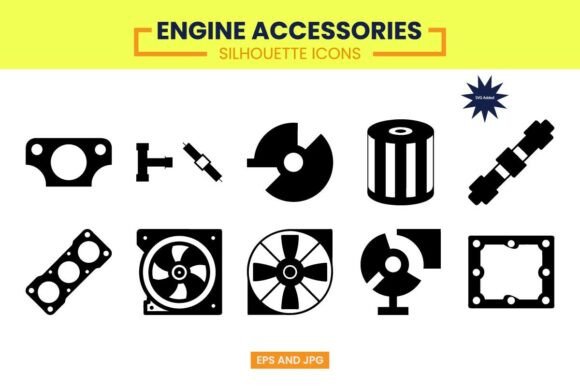
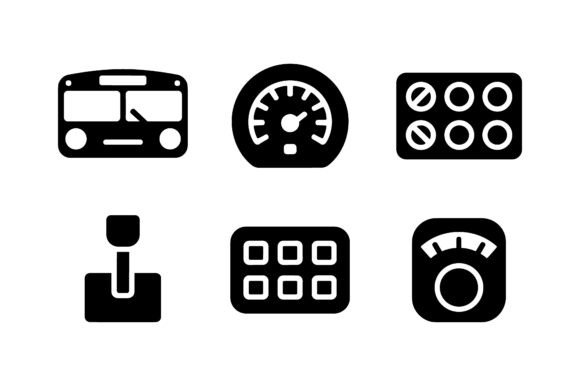
At its core, this product is a single EPS (Encapsulated PostScript) file containing a curated set of vector silhouettes. The icons are designed around themes of measurement, control, and mechanics. You will find standard dashboard elements such as gauges, dials, meters, and a gear shifter, all rendered in a clean, minimalist, and professional glyph style. The emphasis is on clarity and precision, which are essential for technical interfaces where users need to read information quickly and accurately.
The set is delivered as a single ZIP file containing one EPS file. It is important to note that this is a vector-only product: you receive the EPS file and no other formats such as SVG, PNG, or JPG are included. The icons are 100 percent scalable, which means they can be resized without any loss of quality, making them suitable for everything from small mobile app icons to large display panels on an industrial machine.
Who Might Find This Icon Set Useful
Understanding the target audience helps clarify whether this product fits your needs. The icon set is designed for app developers, UI and UX designers, and engineers. It aims to serve as a resource for creating intuitive interfaces and technical illustrations. Consider whether your work falls into any of these categories:
- Developers building automotive or vehicle-related apps: If you are creating a digital dashboard for a car, motorcycle, or any vehicle, icons like speedometers, fuel gauges, and odometers are directly relevant.
- UI/UX designers working on industrial or control panel interfaces: For software that monitors machinery, factory equipment, or energy systems, icons representing settings, controls, and performance metrics are practical.
- Engineers or technical writers creating documentation: If you produce technical manuals, user guides, or infographics about performance metrics, having a consistent set of vector icons streamlines the illustration process.
- Designers working on branding for engineering or automotive firms: The clean, professional style could be adapted for logos or visual identities in these sectors.
However, not every designer will find this set indispensable. If your work is primarily in consumer mobile apps unrelated to measurement or control, or if you require highly detailed or photorealistic icons, this set may feel too narrow or too minimal for your needs.
Key Benefits and Strengths of the Set
The Control Panel Dashboard Icon Set EPS offers several tangible advantages for the right user. Recognizing these strengths helps you assess its value relative to other options.
Vector Scalability and Clean Aesthetic
Because the icons are vector-based and fully scalable, they maintain crisp edges at any size. The minimalist glyph style is intentionally simple, which reduces visual noise in an interface. For dashboards and control panels, where screen space is often limited and information density is high, simple icons can improve scanability and reduce cognitive load for users. The professional look also lends a sense of reliability and precision, which is beneficial for technical applications.
Focused Theme for Dashboard and Control Contexts
Unlike generic icon libraries that contain hundreds of unrelated symbols, this set is purpose-built for control panels and dashboards. Every icon is relevant to measurement, control, or mechanics. This focus can save you time because you are not sifting through unrelated icons to find what you need. For a project with a tight deadline, having a curated set of exactly the right types of icons can be a practical advantage.
Single EPS File for Easy Management
Some users appreciate receiving a single EPS file rather than a folder with dozens of individual files. This can make importing, editing, and organizing the icons simpler if you work with vector editing software like Adobe Illustrator. You can open one file, select the icons you need, copy them into your project, and adjust colors or sizes as required.
Important Tradeoffs and Limitations
No product is without compromises, and this icon set has several characteristics that may be constraints for some users. Being aware of these tradeoffs is essential for an informed decision.
No Raster or Alternative Vector Formats Included
The most significant limitation is the file format offering. The product includes only an EPS file. It does not include SVG, PNG, JPG, or other common formats. For many modern design workflows, SVG is preferred because it is widely supported in web development, Figma, Sketch, and other tools. EPS files are older and less universally supported in current design software. If you use a tool that does not handle EPS well, or if you need to use the icons directly on the web without converting them, you will need to perform additional conversion steps. This adds friction to your workflow and may require extra software or time.
Limited Number of Icons and No Customization Options
The set is described as a collection of dashboard-themed silhouettes. The exact number of icons is not specified, which can make it difficult to evaluate whether the set covers your specific needs. For example, if you require icons for battery status, temperature, or acceleration, you will need to check whether those are included. Additionally, there is no mention of customization services. You receive the icons as-is. If you need a specific icon that is not in the set, you must create it yourself or look elsewhere.
Silhouette Style May Not Suit All Interfaces
The clean silhouette style is a deliberate design choice, but it may not work for every project. Some interfaces benefit from filled icons, outlined icons, or multicolor icons. The monochromatic, solid silhouette approach is versatile, but it can also be perceived as generic or lacking in personality. If your design language requires more expressive, detailed, or varied iconography, this set may feel too uniform.
When the Control Panel Dashboard Icon Set EPS Is a Strong Fit
Certain scenarios make this icon set particularly suitable. Recognizing these contexts helps you determine if it aligns with your project goals.
- Early-stage prototyping and wireframing: If you need placeholder icons that are broadly recognizable for a dashboard concept, this set provides quick, clean visuals without the overhead of a full icon system.
- Technical documentation and infographics: When creating diagrams for manuals or reports, the professional style and scalability of EPS make these icons practical for print and digital layouts.
- Niche applications with focused requirements: If your project is specifically about vehicle dashboards, industrial controls, or performance metrics, the curated theme reduces the noise of irrelevant icons.
- Designers comfortable with EPS workflow: If you regularly use Adobe Illustrator or another vector editor that handles EPS natively, the single-file delivery is straightforward.
When Alternatives May Be Worth Considering
In other situations, you might find better value in alternative icon solutions. Here are some scenarios where looking elsewhere could be beneficial.
If You Need Multiple File Formats
Most modern icon libraries offer SVG, PNG, and often PDF versions alongside EPS. If your workflow requires web-ready SVG files or raster PNGs for quick use, a library that provides these formats will save you from the conversion burden. For example, many commercial and free icon sets on platforms like The Noun Project or Iconfinder offer SVG and PNG downloads by default.
If You Require a Comprehensive Icon System
For large-scale projects, a set of 20 or 30 icons may not be sufficient. You might need icons for navigation, data visualization, user actions, and status indicators in addition to dashboard-specific symbols. In that case, a larger icon library or a complete icon system like Font Awesome, Material Icons, or a custom-built set would be more appropriate. These systems offer broader coverage and often include consistent design guidelines for all icons.
If You Prefer Open Source or Free Options
There are many free icon sets available that include dashboard and control related symbols. Depending on the license, you might find a suitable collection at no cost. For instance, the Feather Icons set includes some gauge and settings icons, while SVG Repo hosts thousands of free SVG icons. If your budget is limited or if you need icons for a non-commercial project, exploring free alternatives before purchasing a paid set is a prudent step.
Practical Considerations for Decision Making
Before making a purchase, consider the following practical steps to evaluate whether the Control Panel Dashboard Icon Set EPS meets your needs.
Assess Your Technical Workflow
Check whether your design tools support EPS files. If you use Figma or Sketch, EPS compatibility may be limited. You might need to convert the file using an external tool or import it into Illustrator first. If this extra step is acceptable, the set can still work. If not, look for a library that matches your preferred file format.
Evaluate the Icon Count and Coverage
Since the product description does not list every icon, consider reaching out to the seller to confirm the full set of symbols. Alternatively, look for screenshots or previews that show the complete collection. Make sure the set includes the specific icons you need, such as a tachometer, pressure gauge, temperature dial, or gear stick. If critical icons are missing, you may need to supplement them from another source, which can introduce style inconsistencies.
Consider Scalability for Future Projects
If you anticipate working on multiple dashboard or control panel projects, evaluate whether this set is a one-time resource or part of a broader system. A single EPS file with a fixed set of icons may serve one project well but offer less value for ongoing work. In contrast, a subscription to an icon service or a larger library may provide more long-term flexibility.
Weigh Cost Against Alternatives
Compare the price of this set with other icon resources. Free collections may offer similar icons if your needs are basic. Paid libraries often include more icons, multiple formats, and regular updates. Determine whether the cost aligns with the value you receive, considering the time you might save versus the effort needed to work around format limitations.
Making the Final Determination
The Control Panel Dashboard Icon Set EPS is a focused, professional collection that can serve specific use cases well. Its strengths lie in its clean vector design, dedicated theme, and single-file convenience for users comfortable with EPS. However, the lack of alternative formats, limited icon count, and narrow style may not suit every project. The deciding factors for most designers will be the compatibility with their workflow and the specific icons they need. If your project matches the set's focus and you can work efficiently with EPS, it can be a practical addition to your toolkit. If you require more flexibility, broader icon coverage, or a different file format, exploring alternative solutions will likely serve you better. By evaluating your requirements against these criteria, you can make a confident and informed choice.