Annual Report PowerPoint Template: A Modern Approach to Presenting Corporate Performance
Annual reports have long served as the definitive document for communicating a company's financial health, strategic direction, and achievements over the past year. Traditionally, these reports were dense, text-heavy PDFs or printed booklets. However, the digital age has shifted expectations: stakeholders, investors, and team members now expect visual storytelling that is both informative and engaging. The Annual Report PowerPoint Template bridges this gap by offering a simple, contemporary, yet powerful design that transforms raw data into a compelling narrative. Whether you are a startup founder, a corporate communications manager, or a financial analyst, leveraging a well-structured presentation template can elevate your annual report from a routine obligation to a strategic asset.
Why Traditional Annual Reports Need a Visual Overhaul
Financial data alone rarely inspires confidence or captures attention. A spreadsheet of revenue figures, profit margins, and market share percentages can feel abstract and disconnected from the human effort behind them. Modern audiences crave context and clarity. When you present your annual results using a template built specifically for this purpose, you accomplish several essential goals at once:
- Improved comprehension: Infographics, charts, and tables convert complex quantitative data into digestible visuals.
- Brand consistency: A unified slide deck with master slides ensures that your company colors, fonts, and logos appear systematically throughout the report.
- Time efficiency: Instead of designing from scratch, you drop your content into pre‑built layouts and focus on the message.
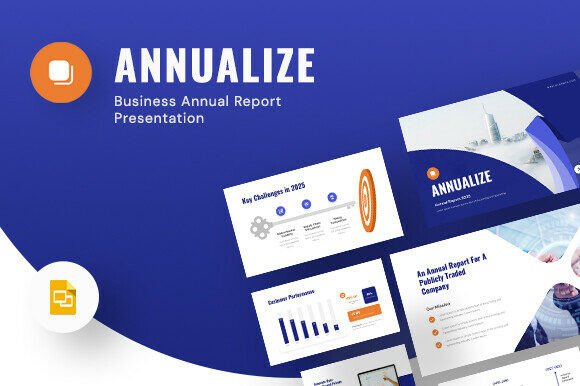
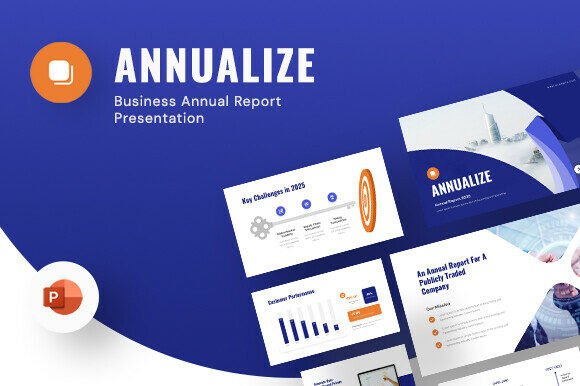
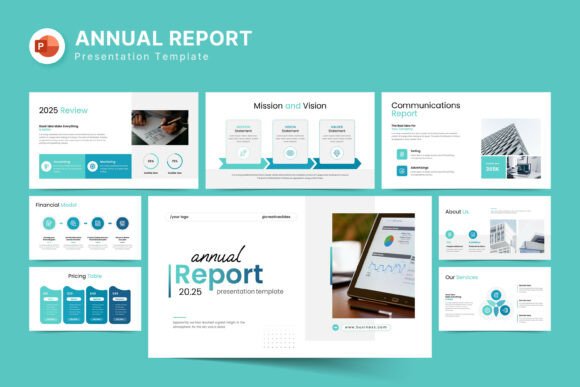
The Annual Report PowerPoint Template is designed with these realities in mind. It provides 27 slides in total, each offering a distinct layout that can accommodate everything from an executive summary to detailed financial breakdowns. Because it works on both Apple and Windows operating systems, collaborators using different platforms can edit and review without compatibility issues.
Master Slides for Consistent Branding
One of the most valuable aspects of this template is the inclusion of master slides. Instead of manually adjusting fonts, background colors, and spacing on every page, you can set global styles once. This is especially useful for organizations that need to adhere to strict brand guidelines. For example, a corporate communications officer can update the company’s primary color and watch it propagate across all 27 slides instantly. The master slide approach also ensures that headings, footers, and page numbers remain uniform, which enhances the professional appearance of the final document.
Drag‑and‑Drop Picture Replacement
Visuals play a critical role in humanizing an annual report. Whether you are showcasing a new office space, a team of engineers, or a community outreach event, the template allows you to simply drag and drop new images into placeholder frames. This eliminates the need to resize or crop manually, saving hours of tedious work. For instance, a nonprofit can swap generic stock photos with authentic images of their volunteers, making the report feel genuine and connected to real people.
Easy Color Change and 16:9 Full HD Ratio
Another significant advantage is the flexibility to change the entire color scheme with minimal effort. If your company rebrands mid‑year, you can adapt the presentation without starting over. The 1920×1080 pixel resolution ensures that your slides look crisp on modern displays, projectors, and even when exported as PDFs. This Full HD ratio is the standard for most conference rooms and online sharing platforms, so your audience sees exactly what you intended.
Free Fonts and Help File
The template uses a free font that is linked within the help file, so you do not need to purchase additional licensing. This is a boon for small businesses and independent consultants who operate on tight budgets. The help file also provides step‑by‑step instructions for installing the font and customizing the slides. Even users with limited PowerPoint experience can follow along and produce a polished report.
Corporate Finance and Investor Relations Teams
For publicly traded companies, the annual report is a legal requirement and a communication tool. Using a template designed specifically for this context ensures that all mandated sections—such as management discussion, financial statements, and forward‑looking statements—are presented clearly. The template’s table slides can display income statements and balance sheets without clutter, while diagram slides can illustrate cash flow cycles or revenue streams. When presenting to analysts, a clean design conveys professionalism and attention to detail.
Startups and Small Businesses
Startups may not have the resources of a large corporation, but they still need to impress angel investors, venture capitalists, and potential partners. A well‑crafted annual report using this template can highlight key milestones, user growth, and product launches in a visually compelling way. The vector icons included in the design allow for creative storytelling—for instance, using an icon alongside each key metric to make the slide more memorable. Additionally, the ability to change colors quickly helps startups align the report with their unique brand identity without hiring a designer.
Educational Institutions and Nonprofits
Universities and charitable organizations often need to present annual impact reports to donors, board members, and the public. While financial data matters, these audiences are equally interested in stories and outcomes. The template’s photo layouts provide ample space to showcase campus life, research breakthroughs, or community programs. Infographics can illustrate how donations are allocated, and timeline diagrams can show progress over several years. Because the template is easy to edit, a small development team can produce a professional report that rivals those from larger institutions.
Practical Use Cases and Real‑World Examples
Imagine a mid‑sized technology company that just completed a fiscal year with a 40% increase in revenue. Using the Annual Report PowerPoint Template, the communications manager can start with a title slide that includes the company logo and a tagline. The second slide might use an infographic to show revenue growth over the past five years, with vector icons representing different product lines. A subsequent slide could display a table of key financial ratios, such as gross margin and operating expenses, making it easy for investors to scan. Later, a diagram slide might depict the company’s organizational structure or the flow of its supply chain.
Another example involves a local nonprofit that relies on grants and donations. Their annual report needs to demonstrate accountability and impact. With the template, they can dedicate a slide to a photo gallery of beneficiaries, another to a bar chart comparing funds raised each quarter, and a third to a timeline of programs launched. The drag‑and‑drop feature makes it simple to update these visuals year after year, so the report becomes a sustainable part of their communication strategy.
Images Used in Demos Are Not Included
It is important to note that the demo images shown in the template preview are for illustration only. The purchase includes the PowerPoint file, the help file, and pointers to free fonts. You will need to supply your own photographs, icons, or stock images. However, because the template uses placeholders, you can quickly swap in your own visuals without adjusting the underlying layout. Many users find that using their own images actually enhances authenticity and alignment with their brand.
Support from Skilled Designers
Another consideration is the availability of real support. The template comes with free assistance from experienced designers. If you encounter a problem—such as a font not rendering correctly or a slide that doesn’t behave as expected—you can contact the support team. This is a valuable safety net, especially for users who are not PowerPoint power users. The support can help you troubleshoot and customize the template to meet specific requirements, such as adding slides for a shareholder letter or adjusting the aspect ratio for a video presentation.
Plan Your Content First
Before opening the template, outline the key sections your annual report should include: executive summary, business overview, financial highlights, operational achievements, risk factors, and future outlook. Once you have a rough structure, browse the 27 slides to see which layouts match each section. For example, if you have four key metrics, a slide with four icon‑based boxes might be ideal. If you need to present quarterly results, a line graph slide would work better.
Leverage Master Slides for Efficiency
Use the master slide view to set your brand’s primary and secondary colors, default font styles, and recurring elements like page numbers and footers. This will save you from manually formatting each slide and ensure consistency. If your company uses a specific pantone color, you can enter its hex code in the theme colors section, and the entire deck updates automatically.
Incorporate Data with Infographics
Numbers alone can be dry, but when you combine them with infographics and vector icons, they become persuasive. For instance, instead of saying “customer satisfaction increased by 15%,” use a small icon of a smiling face next to a percentage arrow. The template includes ready‑made infographic elements, but you can also add your own. Keep each infographic focused on one insight to avoid overwhelming the viewer.
Tell a Story with Visuals
An annual report is more than a collection of data points; it is the story of your organization’s journey over the past year. Use the photo layouts to highlight key events, such as product launches, awards, or team celebrations. A timeline slide can show the sequence of significant milestones. By alternating between analytical slides (tables, charts) and human‑interest slides (photos, quotes), you maintain the reader’s attention while building a narrative arc.
Adaptability Across Industries
The versatility of the Annual Report PowerPoint Template makes it suitable for a wide range of fields. In the healthcare sector, a hospital system can use the template to present patient outcomes, research funding, and new facility openings. In education, a school district might showcase graduation rates, standardized test scores, and innovative programs. Even individual consultants, such as financial advisors or marketing strategists, can use the template to create a professional annual review for their clients. Because the design is contemporary but not overly trendy, it will remain visually relevant for several years.
The Role of Free Real Support
One of the distinguishing features of this template is the promise of free real support from skilled designers. Many pre‑built templates are sold with no after‑sales assistance, leaving buyers to figure out issues on their own. Here, if you need help with editing, technical glitches, or customization, you can reach out directly. This is especially reassuring for users who are not design‑savvy or who need the report completed under a tight deadline. Knowing that someone can guide you through the process reduces the stress of producing a high‑stakes document.
Final Thoughts on Elevating Your Annual Report
Creating an annual report that resonates with stakeholders does not require a full‑time design team or expensive software. A well‑structured Annual Report PowerPoint Template provides the foundation you need to present your achievements clearly and attractively. Its combination of master slides, easy picture replacement, color flexibility, and support makes it a practical choice for businesses of all sizes. By investing time in planning your content and customizing the template to reflect your brand, you can produce a report that not only meets compliance requirements but also strengthens trust and engagement with your audience.
Whether you are highlighting a record year of growth, navigating a challenging market, or celebrating a decade of impact, the visual power of a thoughtfully designed presentation will help your message land with impact. The template is a tool, but it is a tool that empowers you to tell your story on your own terms. And in an era where attention spans are short and competition for capital is fierce, that ability is more valuable than ever.