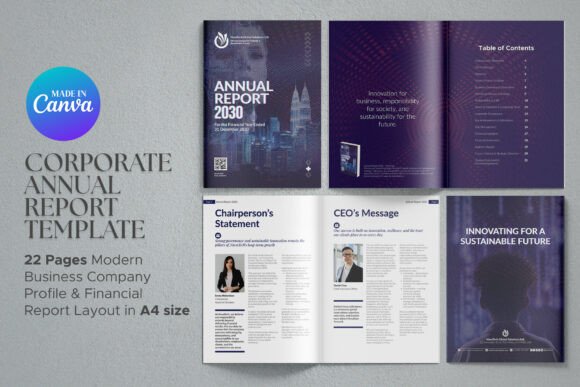
Corporate Annual Report Canva Template
Every business reaches a point where it needs to communicate its performance to stakeholders, investors, or clients in a way that feels both professional and accessible. A well-designed annual report does more than present numbers—it tells your company’s story, highlights achievements, and builds trust. The Corporate Annual Report Canva Template offers a practical solution for creating such a document without needing a design team or expensive software. With 22 pages of ready-to-use sections, an A4 layout, and fully editable content, it’s a tool that can help you present your company’s performance with confidence.
Whether you’re preparing for an investor meeting, a board presentation, or a public release, this template gives you a structured foundation. You focus on the data and narrative; the design framework does the heavy lifting. It’s a straightforward way to turn complex information into a clear, visually appealing report.
What Makes This Template Stand Out
The strength of this Corporate Annual Report Canva Template lies in its balance between professionalism and usability. It doesn’t overload you with unnecessary flair. Instead, it provides a clean canvas that lets your content shine. The 22-page structure covers all the essential sections a stakeholder expects, from the Chairperson’s Statement to the Auditor’s Report. Each page is designed in A4 size, which means it prints cleanly and looks consistent across digital and physical formats.
One notable feature is the inclusion of infographics and icons. These elements help you visualize data like financial highlights or market trends without needing to create graphics from scratch. The layout is intentional—white space is used effectively to keep the report readable, and the typography choices lean toward authority and clarity. For businesses that want to convey stability and competence, this design language works well.
Sections You Can Use Right Away
The template comes with pre-built sections that mirror what you’d find in a high-end corporate report. This saves you from wondering what to include or how to organize it. Here are some of the key sections you can populate with your own content:
- Chairperson’s Statement and CEO’s Message – These pages give leadership a space to address shareholders directly, set the tone for the year, and highlight strategic direction.
- Vision, Mission, and Business Overview – Remind stakeholders of your core purpose and how the business performed against that backdrop.
- Market Strategy and Sustainability CSR – Show how you’re positioning in the market and contributing to broader societal goals. This is increasingly important for modern investors.
- Governance and Board of Directors – Build confidence by presenting your leadership team and governance structure clearly.
- Key Achievements and Risk Management – Balance success stories with transparency about challenges and how you mitigate them.
- Financial Highlights and Auditor’s Report – Present numbers in a digestible way, using the included infographic layouts.
Each section is labeled and designed to flow logically from one topic to the next. You don’t have to guess where to place what—just replace the placeholder text with your own information.
Practical Applications for Different Users
This template isn’t limited to large corporations. Freelancers, consultants, and small businesses can also benefit. If you run an agency, you can customize the report to showcase your annual results to clients or potential partners. For startups seeking funding, a polished report can make a strong impression during pitch meetings. Educators and non-profits might adapt it for program impact reports, using sections like CSR and governance to demonstrate accountability.
For marketers, the template serves as a content hub. You can repurpose sections for blog posts, social media highlights, or investor newsletters. The consistent branding across pages also reinforces your corporate identity. If you’re a creator or publisher, consider using a simplified version of this template for an annual review of your projects, audience growth, or financial transparency with partners.
One practical use case I’ve seen is a mid-sized logistics company using this template to replace their clunky PDF report. They imported their branding, added real photos of their team and operations, and delivered the report both as a printed booklet and a digital download. The feedback from clients and investors was positive—the report looked more organized and professional than previous years.
Why This Template Saves Time and Effort
Creating an annual report from scratch can take weeks. You have to design page layouts, source icons, format tables, and ensure consistency. This Corporate Annual Report Canva Template reduces that to hours. The text is fully editable, so you can adjust wording, fonts, and colors to match your brand. Infographics are already built in—you just update the data. Icons are included, which eliminates the need to search for vector graphics or worry about licensing.
Because it’s made in Canva, you don’t need advanced design skills. If you’re familiar with dragging and dropping elements, you can make changes quickly. Canva’s free or Pro account both work with this template. The Pro account gives you access to additional stock photos and elements, but the template itself functions well with the free version.
Another efficiency gain is the reuse potential. Once you customize the template, you can save it as a brand template for future years. Just update the data and achievements—the structure remains intact. This consistency helps stakeholders recognize your reporting format over time, which builds familiarity and trust.
Tips for Customizing Your Report
While the template is designed to be plug-and-play, a few practical steps can elevate your final result. Start by replacing all placeholder text with your actual content. Pay attention to consistency in tone—the Chairperson’s Statement might be formal, while the Market Strategy section can be more forward-looking.
Next, add your own photos. The template includes image placeholders, so swap those with professional shots of your team, office, or operations. Avoid generic stock photos if possible; real images build credibility. If you don’t have high-quality photos, consider hiring a photographer for a half-day session. That investment pays off across multiple reports and marketing materials.
Branding matters. Update the color palette to match your corporate identity, and insert your logo on key pages. The template uses neutral tones by default, which work well as a starting point. But leaning into your brand colors makes the report feel yours.
Review the infographics carefully. If your data doesn’t fit perfectly, adjust the charts or use Canva’s graph tools. The template provides a framework, but accurate data visualization is crucial. Double-check your financial numbers and ensure the auditor’s report section reflects the actual document.
How to Get Started
Accessing the template is straightforward. After purchase, you download a PDF file that contains a link to open the design in Canva. Once you click the link, the template will appear in your Canva account—you can start editing immediately. There’s no complicated setup or software installation. If you have questions, Canva’s support and community forums offer guidance on common editing tasks.
Before you begin, consider your audience. A public company might need more sections on regulatory compliance, while a private business can focus on growth stories. The template’s flexibility allows you to omit or rearrange pages. It’s a starting point, not a rigid framework.
If you’re on a tight deadline, prioritize the sections your stakeholders care about most. Often, the Financial Highlights, CEO’s Message, and Key Achievements are the first pages people read. Make those polished, then work on the rest.
The Corporate Annual Report Canva Template is a practical tool for anyone who needs to present company performance without a massive investment in design resources. It respects your time, simplifies the process, and helps you produce a report that reflects well on your organization. Whether you’re a solo entrepreneur or part of a larger team, this template can help you communicate your story effectively.